
Using plugins
Extend your tagging server with powerful plugins
Plugins help you extend your tagging server for real-world use cases – for more reliable data, greater control, and reduced data loss.
Select
Choose the plugin that matches your use case.
Configure
Adjust the plugin to your requirements.
Select
Plugin selection for your tagging proxy
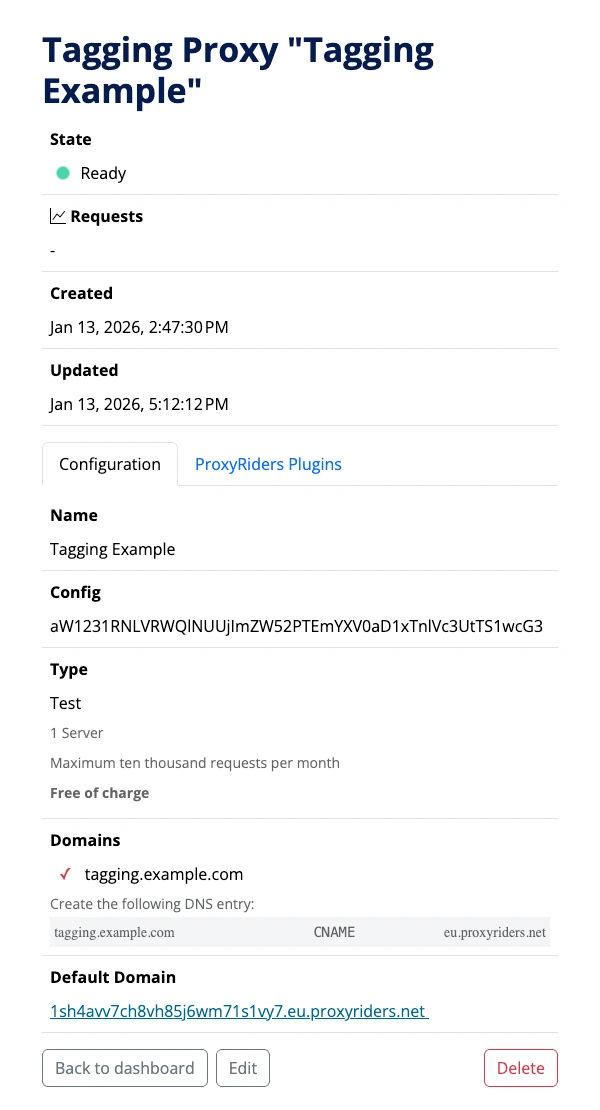
Open the dashboard and select the tagging proxy you want to edit.
On the tagging proxy details page, you’ll see a section with the current status at the top.
Below that, you’ll find the configuration of your tagging proxy, split into two clearly separated areas organized via tabs.
In the first tab, “Configuration”, you’ll find the basic configuration of the tagging server. Here you manage fundamental settings such as name, Google Tag Manager container configuration, tagging proxy type, and the connected domains. You already know these settings from creating the tagging proxy; they’re explained in more detail in Getting Started with ProxyRiders.
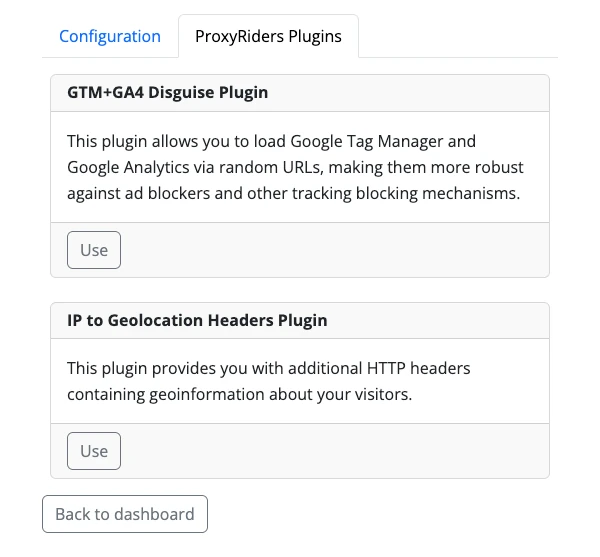
In the separate tab “ProxyRiders Plugins”, you configure all additional plugins to extend your tagging server with extra functionality. This keeps the basic setup and optional extensions clearly separated, and you can enable or adjust plugins independently of the core configuration.
Select
Choose the right plugin for your requirements
Go to the detail view of your tagging proxy, scroll to the configuration area, and switch to the ProxyRiders Plugins tab to open an overview of all available plugins for this tagging proxy and start configuring them.
Tip: We’re continuously adding new plugins. Subscribe to our newsletter to stay informed about new plugins.
The individual plugins are described in the following section.
Configure
Plugin: Adblocker protection
Reduces data loss caused by ad blockers and browser-side tracking restrictions.
Many ad blockers and tracking-prevention mechanisms block tracking requests directly in the browser before they ever reach Google Tag Manager or your tagging server.
This plugin helps route requests through your tagging server and ensures reliable data collection despite the use of ad blockers.
Typical use cases:
- More complete analytics and conversion data
- More reliable server-side tagging with restrictive browsers
Configuration:
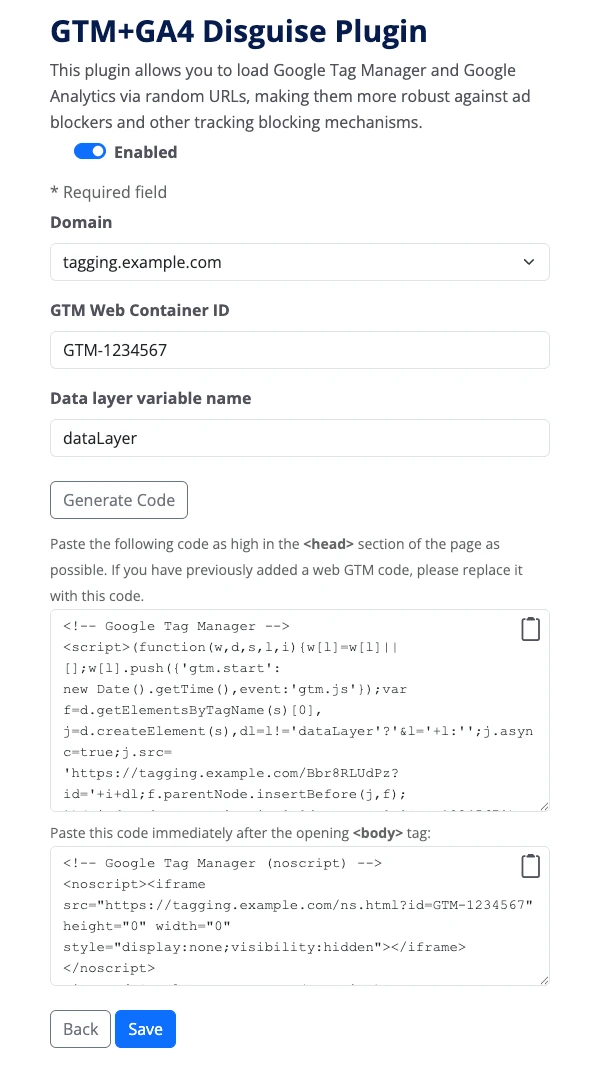
The adblocker protection configuration is used to generate a custom Google Tag Manager integration snippet.
First, select the tagging domain for which the code should be generated. Then enter the ID of the Google Tag Manager web container that should be delivered. For special use cases, you can also adjust the name of the data layer variable.
After clicking “Generate code”, the custom Google Tag Manager integration snippet is created.
Important:
To activate adblocker protection, the Google Tag Manager integration on your website must be replaced with the generated integration snippet.
Configure
Plugin: Geolocation headers
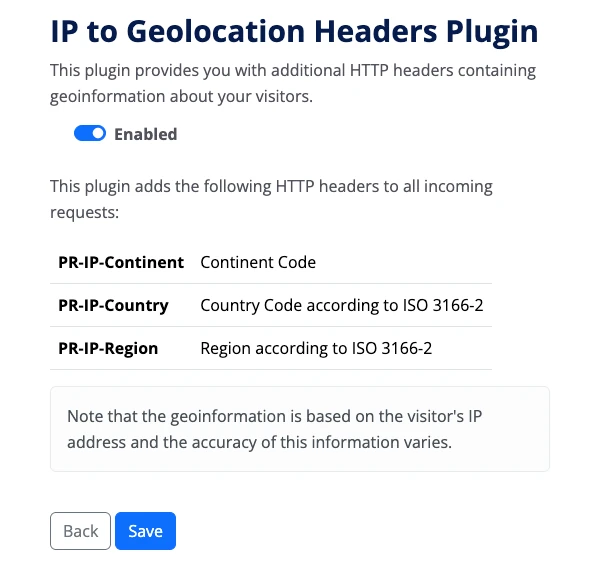
Adds additional HTTP headers with geolocation information based on the visitor’s IP address.
Typical use cases:
- Regional reporting in analytics tools
- Location-based logic in the server container
- Support for consent or routing decisions
Provided HTTP headers:
- PR-IP-Continent – Continent code
- PR-IP-Country – Country code (ISO 3166-2)
- PR-IP-Region – Region code (ISO 3166-2)
Good to know:
Geolocation data is derived from the visitor’s IP address. Accuracy may vary depending on region and network provider.
Activation & Support
After clicking “Save”, your plugin is activated for your tagging server.
Do you have questions or need support?
Email us at hello@proxyriders.com.
Ready in five minutes
Create your own tagging server now and try it free for four weeks
Any questions?
Frequently asked questions
Are plugins included in all plans?
Yes. Plugins are available in all ProxyRiders plans.
You can use plugins regardless of your selected plan. There are no additional costs for activating individual plugins.
Can I enable plugins later?
Yes. Plugins can be enabled or disabled at any time.
You decide if and when you want to use plugins. You do not need plugins to operate a tagging proxy.
Do plugins affect performance?
Plugins can affect request processing because they execute additional logic at the server level.
In most cases, the performance impact is minimal and not noticeable in day-to-day operation. All plugins are designed to be efficient and resource-friendly.
Are plugins GDPR-compliant?
Yes. Plugins are designed to be GDPR-compliant and run entirely within ProxyRiders’ European infrastructure.
In addition, many plugins are explicitly built to improve the GDPR compliance of your tracking. For example, the Geolocation Headers plugin provides geolocation information server-side so that IP addresses can be removed before data is forwarded to third-party systems, while location information remains available.
Why do we call tagging servers “tagging proxies”?
Because a tagging server doesn’t just sit somewhere on the internet collecting data. It mediates. It filters. It protects.
“Tagging server” is technically correct, of course. We simply believe that “tagging proxy” describes the role better.