
Setup
It’s as simple as that
Set up your own tagging server in just three steps
Register
for free
Sign up for free at ProxyRiders.
Setup tagging server
Configure your own tagging server.
Connect your domain
Recommended: Connect your custom tagging domain.
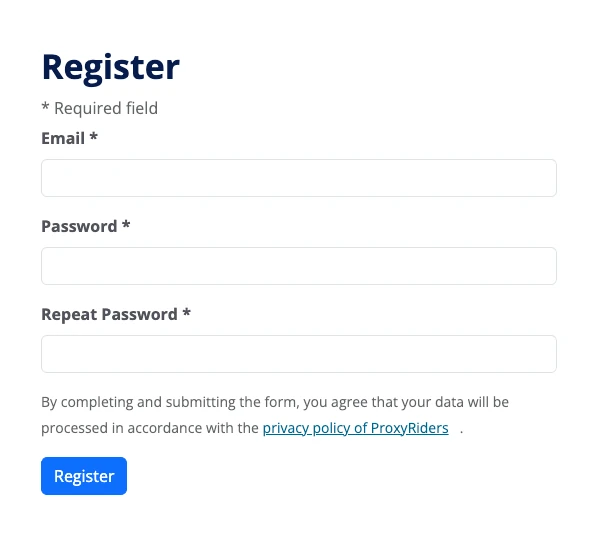
Register for free
Register for free with ProxyRiders
Getting started with ProxyRiders is straightforward. First, create a free user account.
- Visit our registration page.
- Enter your email address.
- Choose a secure password.
- Click “Register”.
Important: Confirm your email address by clicking the link in the confirmation email.
Setup tagging server
Configure your tagging server
After logging in, you can create your first tagging server.
Required information:
- Name
A freely selectable project name for better overview. - Config
The configuration string of your server container.
Tip: You can find the configuration of your server container in Google Tag Manager by clicking the container ID in the top right corner of the workspace. Then select “Manually provision tagging server” to view the configuration (Container Config).
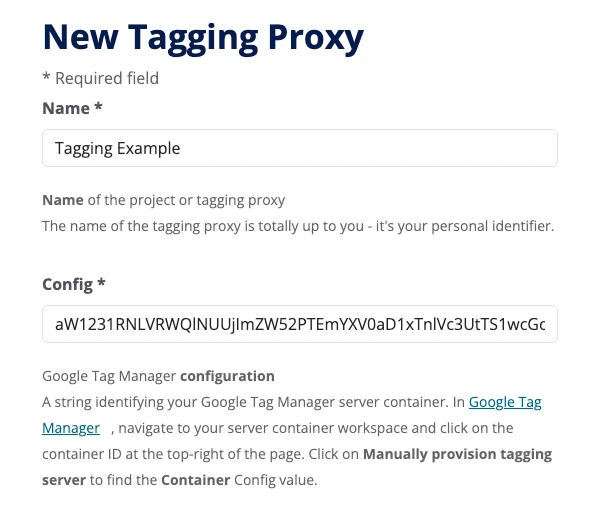
Setup tagging server
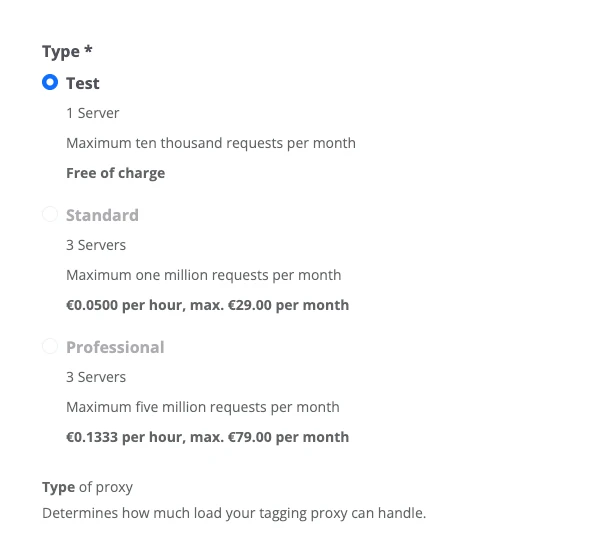
Select a plan
Choose a plan based on your website’s traffic volume (requests per month) and your requirements.
Each incoming request to your tagging server is counted. This includes every transmission sent from a user’s browser to the server – for example, a pageview or another GA4 event.
Requests sent from the tagging server to third-party providers (e.g. Google) are not counted again.
Tip: For most websites, “Standard” is a good choice. You can change your plan at any time.
Connect your domain
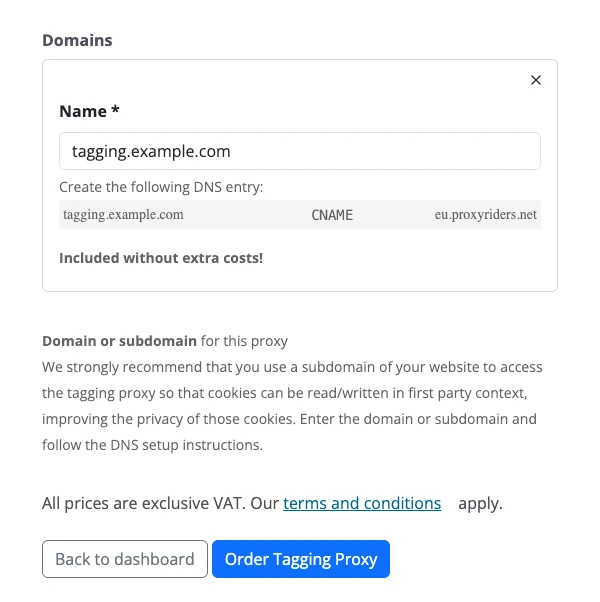
Connect your own tagging domain
A tagging domain is included in every plan at no additional cost.
Required information:
- Name
Your own tagging domain or subdomain.
Complete the configuration of your tagging server by clicking “Order Tagging Proxy.”
Important: Afterwards, create the displayed DNS record for your tagging domain at your DNS provider.
Note: Depending on the provider, it may take several minutes to several hours for the DNS change to take effect.
Completion & support
Congratulations! Your tagging server is now ready to use, and you can update the server URL in Google Tag Manager to your new tagging domain.
If you want to go further, you can adapt and extend your tagging server at any time using ProxyRiders Plugins. Learn more about available plugins and how to configure them in the Plugins documentation.
Do you have any questions or need assistance?
Send us an email at hello@proxyriders.com.
Ready in five minutes
Create your own tagging server now and try it free for four weeks.
Any questions?
Frequently Asked Questions
Why do we call tagging servers “tagging proxies”?
Because a tagging server doesn’t just sit somewhere on the internet collecting data. It mediates. It filters. It protects.
“Tagging server” is technically correct, of course. We simply believe that “tagging proxy” describes the role better.
Which plan is right for me?
Choose based on your website’s traffic (requests per month) and your needs.
Tip: For most websites, the Standard plan is a great place to start. You can adjust your plan at any time.
How can I pay?
Easily via SEPA direct debit or credit card. Billing is done monthly.
Invoices are sent by email and can also be found anytime in your account under “Payment Details / Invoice Details”.
What is the contract term?
There is no minimum term. The Standard and Professional plans are billed by the hour and can be canceled at any time.
The Starter plan runs for 4 weeks and ends automatically – ideal for testing.
How can I cancel?
You can cancel your plan anytime directly in your account.
No cancellation is needed for the Starter plan – it ends automatically after 4 weeks.
How do I calculate the number of requests?
Each incoming request to your tagging server counts – that is, every transmission the user’s browser sends to the server, such as a page view or another GA4 event. Requests from the tagging server to third-party services (e.g., Google) are not counted again. Example: 100,000 page views + 50,000 events ≈ 150,000 requests.